Signing up to TimeShot
Signing up to TimeShot is easy. Simply go to the sign-up page and enter your details.The sign-up process is free and instant - as soon as you click SignUp you are a member.
Once you are a member you can connect cameras and begin viewing them
Using the Timeshot camera play controls
The Timeshot camera play controls allow you to view the images your camera has uploaded the way you want.You can step forward or backward by one image at a time to carefully analyse each shot.
Or you can simply press play and watch as the images automatically stream direct from our servers.
The play controls are as follows:


Go to the search page to find shots from a specific date and time
Automatically stream the latest shots as they are uploaded to the server
Automatically stream the shots going back in time
Automatically stream the shots going forward in time
Go to the shot directly before the current one
Go to the shot directly after the current one
Pause all streaming
Automatically stream the latest shots as they are uploaded to the server
Automatically stream the shots going back in time
Automatically stream the shots going forward in time
Go to the shot directly before the current one
Go to the shot directly after the current one
Pause all streaming
Using the Timeshot timeline search
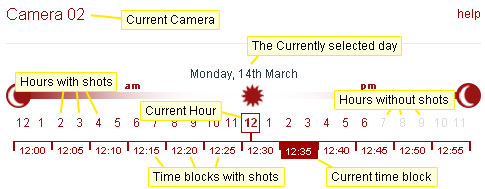
The TimeShot gallery timeline allows you to quickly and accurately view the Shots from a specific time period.When you first view the gallery it will show you the latest available images from your camera.
To select a different day to view click on the desired date in the calendar on the right of the page.
Once you have chosen the correct day narrow your search period by selecting an hour with available shots, and then the five minute block within that hour you wish to view.
You can quickly jump between hours of the same day and five minute blocks within the same hour.
An overview of the search controls: